G-Suite
Synology NAS
Symantec
FortiGate
FortiAnalyzer
ติดต่อเรา
Lorem ipsum dolor sit amet, consectetur
adipiscing elit. Nullam fermentum fermentum
tortor nec dignissim. Nunc sit amet augue dui.
Integer vestibulum vel eros a sollicitudin. Nunc
in rutrum mi. Aliquam mollis ac urna eget
molestie. Aenean vel maximus nisi. Nullam
ligula nunc, iaculis eu leo accumsan,
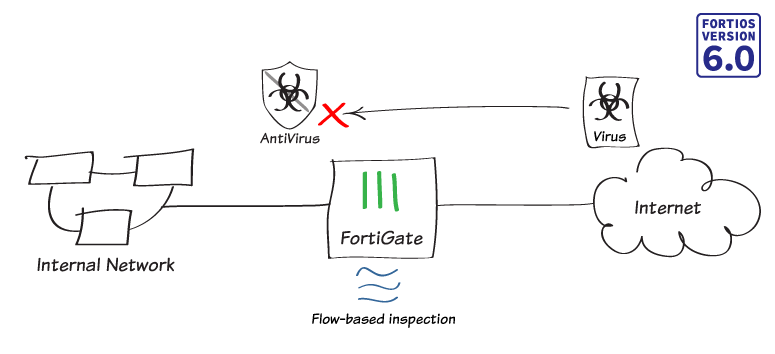
ในกรณีนี้คุณจะเปิด Flow-based inspection บน FortiGate ของคุณ และใช้ Flow-based antivirus scanning กับการรับส่งข้อมูลเครือข่าย (Network traffic)
1. การตรวจสอบ Inspection mode
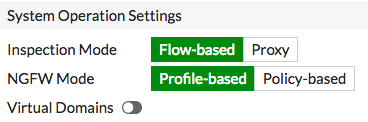
1.1 => Flow-based เป็น Inspection mode เริ่มต้นสำหรับ FortiOS ในการตรวจสอบว่า FortiGate ของคุณอยู่ใน Mode นี้ ให้ไปที่ “System > Settings” และค้นหา “System Operations Settings”
=> ตรวจสอบว่า “Inspection Mode” ถูกตั้งค่าเป็น Flow-based และ “NGFW Mode” ถูกตั้งค่าเป็น Profile-based
2. การกำหนดค่า AntiVirus profile
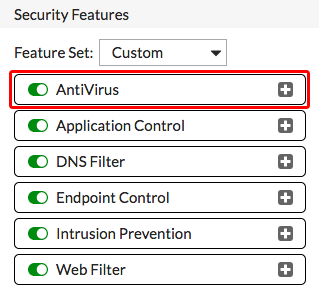
2.1 ไปที่ “System > Feature Visibility” และตรวจสอบว่ามีการเปิดใช้งาน AntiVirus ภายใต้ “Security Features”
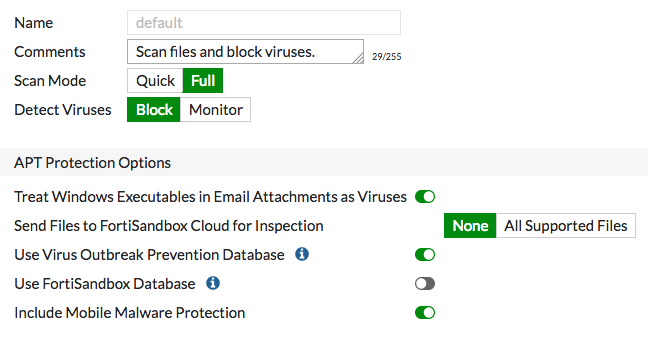
2.2 => ในการแก้ไข Default antivirus profile ให้ไปที่ “Security Profiles > AntiVirus”
=> ตั้งค่า “Scan Mode” เป็น Full และ “Detect Viruses” เป็น Block
=> ภายใต้ “APT Protection Options” ให้เปิดใช้งาน Use Virus Outbreak Prevention Database
3. เปิดใช้งาน Antivirus ใน Policy
3.1 => ในการแก้ไข Policy การเข้าถึงอินเทอร์เน็ตของคุณ ให้ไปที่ “Policy & Objects > IPv4 Policy”
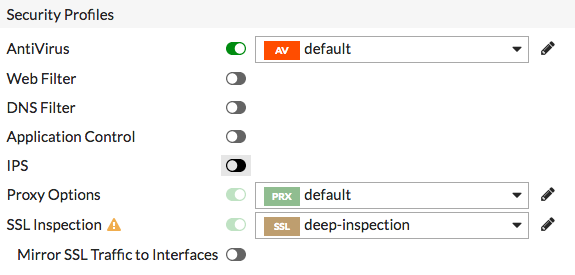
=> ภายใต้ “Security Profiles” ให้เปิดใช้งาน AntiVirus และเลือก Default
=> “SSL Inspection” จะถูกเปิดใช้งานโดยค่าเริ่มต้น เลือก deep-inspection
4. ผลลัพธ์
=> ในการทดสอบการสแกนไวรัส ให้ไปที่ www.eicar.org และพยายามดาวน์โหลด Test file จากนั้น Browser จะแสดงข้อความปฏิเสธการอนุญาตให้ดาวน์โหลดไฟล์
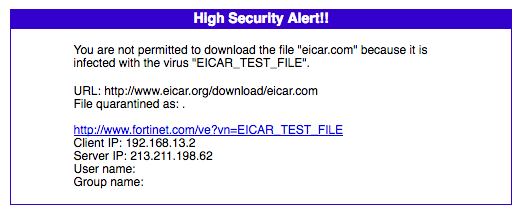
=> หากต้องการดูข้อมูลเกี่ยวกับไฟล์ที่ถูก Block ให้ไปที่ “FortiView> Traffic from LAN/DMZ > Threats”
